Update on the Campaign Status Document
Summary: In this blog post, I go into a deep dive into the details of my status document. Discussin the the structure, functionality, modes of usage, and providing both code snippets and screenshots.
We’ve completed six sessions of In the Shadows of Mont Brun . We’re using Errant 📖 for our campaign in the Savoy region of Europe.
In Test Driving a Campaign Status Document I wrote about my campaign note-taking. Since then, I’ve significantly refined the structure of the document.
I’ve settled on the following top-level headings:
- Player Characters
- Non-Player Characters
- Sessions
- Factions
- Locations
- Bestiary
- Procedures
- Rumours
- Questions
Each heading then has topical sub-headings. (Sidenote: Nothing unique or overly interesting.) And those sub-headings have further notes.
Benefits of the Lowly Outline
This document serves a multi-modal purpose; I use it when preparing my session, while running the session, and then later synthesizing the session.
And because of the outline form being written in Org-Mode 📖 , I have several views into the document. Headings support status custom states, like TODO or WAITING. I can also tag those sections and filter on the tags. Again, basic Org-Mode functionality.
Outline View
With a quick key stroke, I can open a side window to see the top two heading levels of the status document.
I use this functionality while I’m running a session. Taking a quick peek at names, as a reminder of who I might reintroduce.
I can also use the outline for navigation. (Sidenote: Though it is not the only means as I’ll soon explain.)

Technical Implementation
My default outline depth in Org-Mode
is 4.
(Sidenote:
(setq org-imenu-depth 4))
But for the Status Document, I’ve set the outline depth to 2.
(Sidenote:
See 49.2.4 Local Variables in Files of the Emacs 📖
documentation.)
I’ve bound the command imenu-list-smart-toggle to Cmd + 4.
(Sidenote:
s-4 in Emacs
syntax.)
And I’ve added the document local variable org-imenu-depth: 2.
Heading Navigation
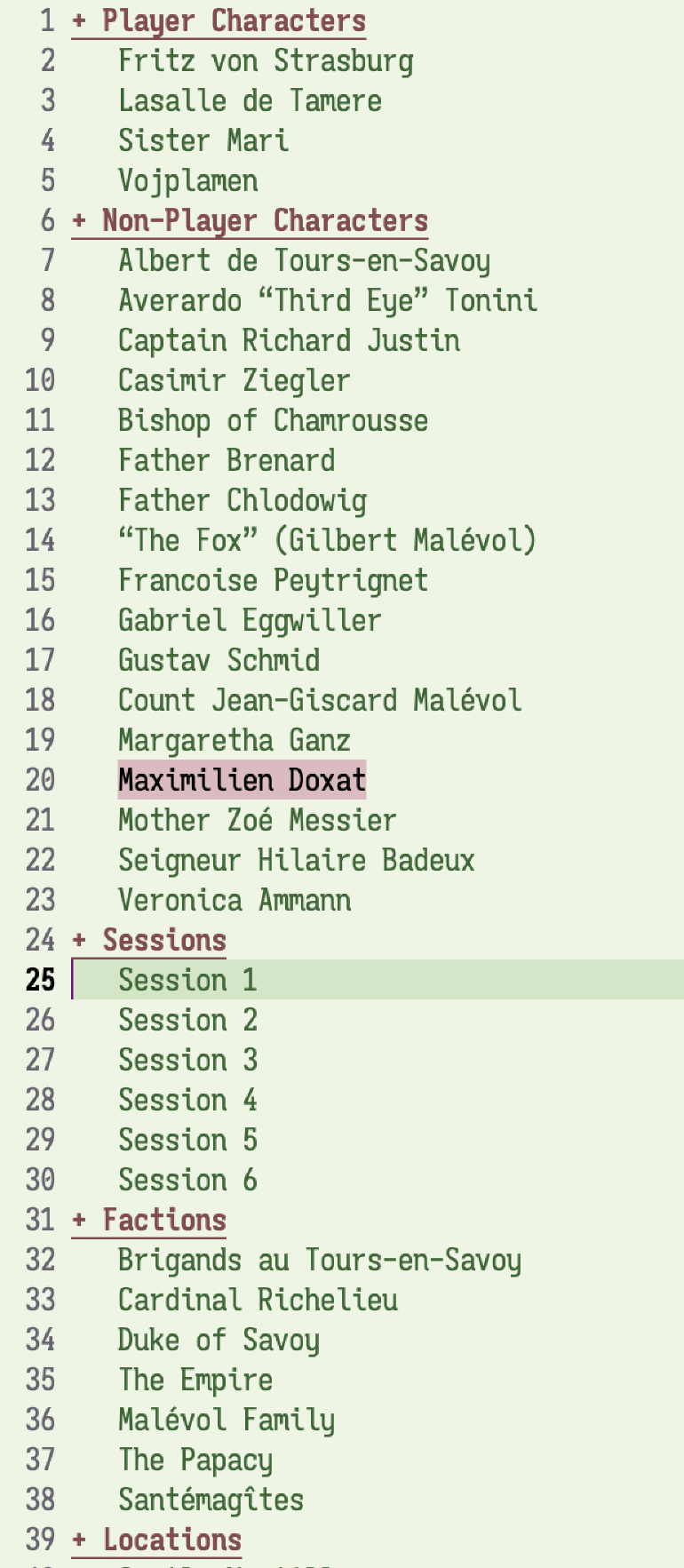
The heading navigation functionality relates to the Outline View functionality, but instead of seeing the full outline, I have a completion prompt.
I start typing and completion mechanism narrows those candidates. I can type Return to jump to that candidate.
I find that while I’m running the game and referencing the document, this quick movement can help me lookup something.
Technical Implementation
This navigation leverages the org-imenu-depth to limit the candidates to the top two heading levels.
I’ve bound the consult-org-heading function to Option + g then o.
(Sidenote:
M-g o in Emacs
syntax. Mentally mapping to the mnemonic of “Go to Outline.”)
In non Org-Mode documents, I bind consult-outline the same key combination.
From Consult’s documentation:
consult-org-heading: Variant ofconsult-imenuorconsult-outlinefor Org buffers. The headline and its ancestors headlines are separated by slashes. Supports narrowing by heading level, priority and TODO keyword, as well as live preview and recursive editing.
I like the ability to see the greater context of a particular heading, which allows for different means of filtering.
I consider the Consult package to be a high-utility enhancement of Emacs default completing read functionality. Mixin the Orderless package, and I have a wonderful fuzzy narrowing capabilities.
The Lowly “Session Notes”
When I’m preparing for the next session, I add a sub-heading under “Sessions”. There I write my notes, create links to resources.
And while I’m running the session, it is here where I write down all of those notes.
While running I might use my random-tables Emacs package 📖 to generate a random encounter, a dice roll, a weather event, or much of anything. And all of those rolls are inserted into the document. In other words, my notes are also a custom application.

List of random tables I’ve transcribed into Emacs
- Ask the Stars
- Black Sword Hack > Attributes
- Black Sword Hack > Demon Name
- Black Sword Hack > How to find the demon you seek
- Black Sword Hack > Nickname
- Black Sword Hack > Oracle Event
- Black Sword Hack > Oracle Question
- Black Sword Hack > Travel Event
- Character Attitudes
- Corporation, Sci-Fi
- Deity
- Descriptive Words to Pair with Concrete Element
- Errant > Archetype > Equipment
- Errant > Character
- Errant > Chase Developments
- Errant > Conspicuous Consumption Failed Save
- Errant > Death & Dying
- Errant > Death & Dying > Burning
- Errant > Death & Dying > Physical
- Errant > Death & Dying > Shocking
- Errant > Death & Dying > Toxic
- Errant > Debt Holder
- Errant > Downtime Event
- Errant > Failed Professions
- Errant > General Downtime Turn Action
- Errant > General Event
- Errant > Grimoire
- Errant > Henchman
- Errant > Keepsakes
- Errant > Lock
- Errant > Reaction Roll
- Errant > Weather
- Escape the Dungeon
- Everything Is Not as Expected
- HRE > Contact
- HRE > Random Encounter > Urban
- HRE > Random Encounter > Wetlands or Coastal
- HRE > Random Encounter > Wilderness
- Herbalist’s Primer > Plant
- Heresy
- How Far Away is a Thing > Distant Thing
- How Far Away is a Thing > Same Place
- In the Shadows of Mont Brun > In the stagecoach
- In the Shadows of Mont Brun > Names
- Inn Name
- Intervention Type
- Ironsworn > Action Oracle
- Ironsworn > Theme Oracle
- Knave > Divine Domain
- Knave > Divine Symbol
- Knave > Potion Effect
- Knave > Wilderness Region
- Knave > Wilderness Structure
- Knave > Wilderness Theme
- Knave > Wilderness Trait
- Laws of the Land
- Location Adjectives of Connection
- Location Adjectives of Disconnection
- Lore24 Insipiration
- Mortal Site
- Mythical Castle Region Encounter
- Mythical Castle Region Fantastical Encounter
- Name
- Noble House
- Noble House > Atriarch Age
- OSE > Attributes > 3d6 Down the Line
- OSE > Monster Motivation
- OSE > Random Dungeon Content
- OSE > Reaction Roll
- OSE > Secondary Skill
- Oblique Strategy
- Oracle
- Person
- Plot Twist
- Random NPC Quirks
- Savoy Region > Random Encounter
- Scarlet Heroes > NPC
- Scarlet Heroes > Reaction Roll
- The Anarchical Grimoire of Propylonic Discharges
- The One Ring > Lore
- The One Ring > Lore > Action
- The One Ring > Lore > Aspect
- The One Ring > Lore > Focus
- What is the monster doing?”
Tabular Views
The above Outline View and Heading Navigation functions are things I’ve been using for quite some time. But the Tabular Views are something I stumbled upon recently and have since further explored.
With each top-level heading I declare a list of keywords that I want to present in a table. Then for each sub-heading I fill out those keywords.
For my Bestiary, the keywords are: Name, Threat (abbreviated as T) Hit Point (HP 📖) , Attacks, Movement Dice (MD 📖) , Morale Level (ML 📖) , and Alignment (abbreviated to AL).
I can then toggle to see the tabular view of those keywords for the sub-heading.
Meaning, I have a quick overview of my the Bestiary stat block.

Technical Implementation
For the Bestiary, I’ve declared the following in the Property Drawer:
:COLUMNS: %ITEM(NAME) %THREAT(T) %HP %ATTACKS %MD %ML %ALIGNMENT(AL)
The %ITEM column populates the table column with the sub-heading’s text. The %ALIGNMENT(AL) specifies the ALIGNMENT property but uses AL as the column heading.
(Sidenote:
Instead of using the NAME property, I could use %ITEM; this would use the heading’s text.)
And then for each sub-heading, I add properties for each of those named elements.
Here is one for a human soldier:
** Soldier
:PROPERTIES:
:ID:       EBC67225-8194-470D-ABC2-29745390F7C0
:HP: 7
:ATTACKS: 1d8 weapon
:ML: 7
:ALIGNMENT: L
:END:
Further, while in the column view, I can edit the properties.
For the Sessions section, I track the Experience Points (XP 📖) earned. I store that as a property on each session, and specify that I want to see a sum of those values. A nice and lazy XP tracker.
Dynamic Table Blocks
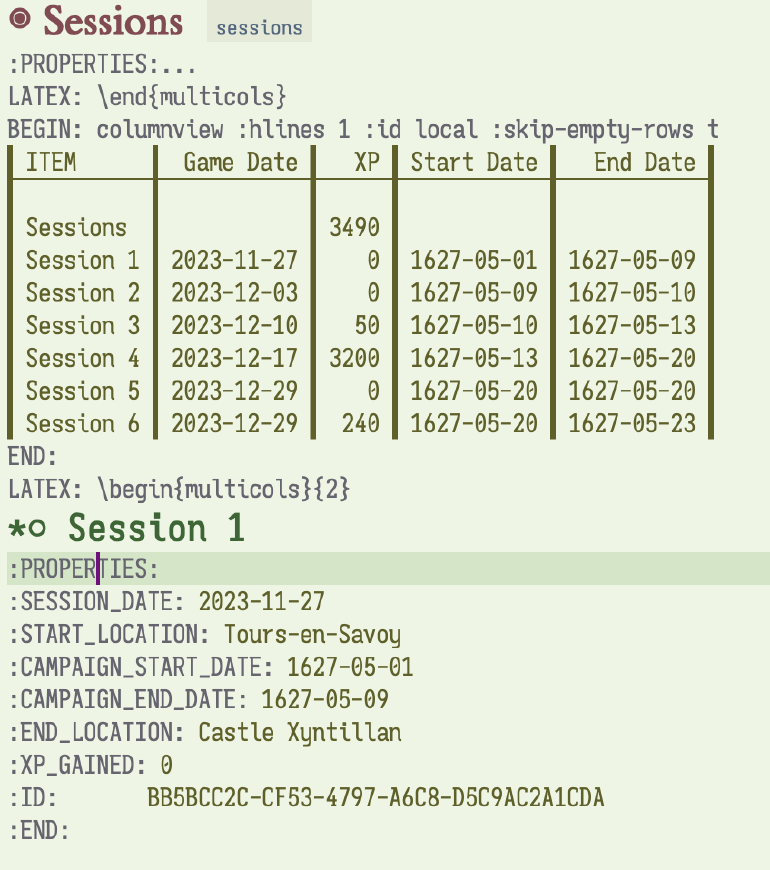
Building on the tabular view, I’ve added three dynamic tables via the columnview declaration.
(Sidenote:
See Capturing column view (The Org Manual) documentation.)
- Player Characters
- Sessions
- Bestiary
These tables reuse the declared columns and show them inline. They are also part of the export, which I’ll get to later.
I use these “always visible” tables to provide quick summaries to help answer in the moment questions:
- Where were they on a given date?
- What are the Player Characters (PCs 📖) names?
- What’s the monster stack block?
Technical Implementation
This is fairly straight forward, I add the following just below the property drawer:
#+BEGIN: columnview :hlines 1 :id local :skip-empty-rows t
#+END:
Then I can call org-dblock-update to populate the table. I also set an save hook to auto-update all tables in the file.
(Sidenote:
Here’s a link to Github for section of code for conditional table recalculation.)
Code for Conditional Recalculation
;;; From https://emacs.stackexchange.com/questions/22210/auto-update-org-tables-before-each-export
;; Recalculate all org tables in the buffer when saving.
(defvar-local jf/org-enable-buffer-wide-recalculation t
  "When non-nil, recalculate all dynamic regions when saving the file.

This variable is buffer local.")
;; Mark `jf/org-enable-buffer-wide-recalculation' as a safe local
;; variable as long as its value is t or nil. That way you are not
;; prompted to add that to `safe-local-variable-values' in custom.el.
(put 'jf/org-enable-buffer-wide-recalculation
     'safe-local-variable #'Boolean)

(defun jf/org-recalculate-buffer-tables (&rest args)
  "Wrapper function for `org-table-recalculate-buffer-tables' and
`org-dblock-update' that runs that function only if
`jf/org-enable-buffer-wide-recalculation' is non-nil.

Also, this function has optional ARGS that is needed for any
function that is added to
`org-export-before-processing-hook'. This would be useful if this
function is ever added to that hook."
  (when jf/org-enable-buffer-wide-recalculation
    (progn
      (org-table-recalculate-buffer-tables)
      (org-dblock-update '(4)))))

(defun jf/org-recalculate-before-save ()
  "Recalculate dynamic buffer regions before saving."
  (add-hook 'before-save-hook
            #'jf/org-recalculate-buffer-tables nil :local))
(add-hook 'org-mode-hook #'jf/org-recalculate-before-save)
Then at the bottom of my status document I added the following to enable the recalculate on save:
# Local Variables:
# jf/org--enable-buffer-wide-recalculation: t
# END:
Radio Links
For awhile, I had been declaring each sub-heading as radio targets. (Sidenote: See Radio Targets (The Org Manual) for more documentation and details.) This would automatically convert all textual references of the heading into links to that heading.
To declare a radio target in Org-Mode , I would prepend the target declaration with \<\<\< and append \>\>\>. I could then refresh the buffer and all instances of that word (except the target) would become links to that target.
What I discovered, however, is that when sub-heading’s text is a radio target, it would produce an empty %ITEM cell for that sub-heading. Before I knew of the %ITEM column name, I had set a :NAME: property.
I did spend an hour trying to specify the org-radio-target-regexp variable, to customize what would be considered a radio target. However, I wasn’t able to make the Regular Expression (RegEx 📖)
work.
Capture Templates
When I’m running a session, I often create Non-Player Characters (NPCs 📖) on the fly. I grab a name, a quirk, and a motivation. And from there run with it.
Given that I use the status document while I’m running a session, I wanted a way to randomly generate an NPC .
I wrote an Org-Mode capture template to perform this task. (Sidenote: See Capture (The Org Manual) for documentation.) I’ve set it up, so that I type a few keys and presto I buffer that shows me this new NPC . I can, in the moment, take notes or refine the NPC .
When complete, I save the buffer and it is inserted into my status document as a sub-heading of the Non-Player Character heading.
As an added bonus, I don’t need to be editing my status document to create an NPC . When the mood strikes, I can start a capture by typing Control+c then c to bring up the capture menu.
Technical Implementation
First, let’s look to the capture template definition. (Sidenote: See my Org Mode configuration on Github.)
("n" "NPC"
 entry (file+headline jf/campaign/file-name "Non-Player Characters")
 "* %(jf/campaign/random-npc-as-entry)\n%?"
 :empty-lines-after 1
 :jump-to-captured t)
- n is the template key.
- “NPC” is the label of the template.
- The
entrydeclaration means to write this as a heading in Org-Mode . (file+headline jf/campaign/file-name "Non-Player Characters")means to file the new entry in the current campaign file-name and as a sub-head of the “Non-Player Characters” heading."* %(jf/campaign/random-npc-as-entry)\n%?"is the template, in this case a headline with most of the body created by myjf/campaign/random-npc-as-entryfunction. More on that in a bit.
The remaining keywords add an empty line afterwards and once I’m done “capturing” this information, Emacs will jump to that file and sub-heading.
The jf/campaign/random-npc-as-entry function.
(defun jf/campaign/random-npc-as-entry ()
  "Create an NPC entry."
  (let* ((random-table/reporter
          ;; Bind a function that will only output the results of the
          ;; table, excluding the expression that generated the results.
          (lambda (expression results) (format "%s" results)))
         (name
          (random-table/roll "In the Shadows of Mont Brun > Names"))
         (quirk
          (random-table/roll "Random NPC Quirks"))
         (alignment
          (random-table/roll "Noble House > Alignment"))
         (lore-table
          (random-table/roll "The One Ring > Lore"))
         (locations
          (s-join ", "
                  (completing-read-multiple
                   "Location(s): "
                   (jf/campaign/named-element :property "NAME"
                                              :tag "locations"))))
         (factions
          (s-join ", "
                  (completing-read-multiple
                   "Faction(s): "
                   (jf/campaign/named-element :property "NAME"
                                              :tag "factions")))))
    (format (concat
             "<<<%s>>>\n:PROPERTIES:\n:NAME:  %s\n:BACKGROUND:\n"
             ":LOCATIONS:  %s\n:DEMEANOR:\n:ALIGNMENT:  %s\n"
             ":QUIRKS:  %s\n:FACTIONS:  %s\n:END:\n\n%s"))
    name name locations alignment quirk factions lore-table))
Using my random-tables Emacs package I randomly create a name, quirks, alignment, and an oracle of action, aspect, and focus. I then use the campaign document to conditionally prompt for relevant locations and factions for the character.
There are more details but those are left as an exercise for the reader.
Exporting
As everything is in an Org-Mode document, I can export to multiple formats; in particular Portable Document Format (PDF 📖) via LaTeX 📖 .
The export recalculates the dynamic tables. It also exports, as definitions, the drawer properties. Meaning these bits of metadata appear as definition lists of term and value.
With Org-Mode , I can also tag headings as ones to skip for export. There are some secrets within my document that are not part of the export.
Here’s a link to my somewhat redacted session notes.
Technical Implementation
To achieve the layout, I use the following LaTeX headers and declarations. (Sidenote: See my Org-Mode include file for this LaTeX configuration.) I then include the file in my document. (Sidenote: This LaTeX configuration will automatically start and stop the two-column functions.)
LaTeX class and header declarations.
#+LATEX_CLASS: jf/article
#+LATEX_CLASS_OPTIONS: [11pt]
#+LATEX_HEADER: \usepackage[linktocpage=true]{hyperref}
#+LATEX_HEADER: \usepackage[french,english]{babel}
#+LATEX_HEADER: \usepackage[a4paper,top=3cm,bottom=3cm]{geometry}
#+LATEX_HEADER: \usepackage{minimalist}
#+LATEX_HEADER: \usepackage{fontspec}
#+LATEX_HEADER: \usepackage{caption} \captionsetup{labelfont=bf,font={sf,small}}
#+LATEX_HEADER: \setmainfont{TeX Gyre Pagella}
#+LATEX_HEADER: \usepackage{enumitem} \setlist{nosep}
#+LATEX_HEADER: \usepackage{longtable}
#+LATEX_HEADER: \usepackage{microtype}
#+LATEX_HEADER: \AtBeginEnvironment{longtable}{\footnotesize}
#+LATEX_HEADER: \usepackage[marginal,hang]{footmisc}
#+LATEX_HEADER: \usepackage{relsize,etoolbox}
#+LATEX_HEADER: \AtBeginEnvironment{quote}{\smaller}
#+LATEX_HEADER: \AtBeginEnvironment{tabular}{\smaller}
#+LATEX_HEADER: \usepackage[printonlyused,nohyperlinks]{acronym}
#+LATEX_HEADER: \usepackage[marginal,hang]{footmisc}
#+LATEX_HEADER: \usepackage{multicol}
#+LATEX_HEADER: \setlength\columnsep{20pt}
#+LATEX_HEADER: \hypersetup{colorlinks=true, linkcolor=blue, filecolor=magenta, urlcolor=cyan}
#+LATEX_HEADER: \tolerance=1000
#+LATEX_HEADER: \usepackage{float}
#+LATEX_HEADER: \usepackage{rotating}
#+LATEX_HEADER: \usepackage{sectsty}
#+LATEX_HEADER: \usepackage{titlesec}
#+LATEX_HEADER: \titleformat{\section}{\normalfont\fontsize{12}{18}\bfseries}{\thesection}{1em}{}
#+LATEX_HEADER: \setcounter{secnumdepth}{1}

# If this is a header; it will affect the table of contents.  But as a LATEX
# command, it happens in the processing order of the org file.
#+LATEX: \let\oldsection\section
#+LATEX: \renewcommand{\section}[1]{\newpage\end{multicols}\oldsection{#1}\begin{multicols}{2}}
For each of the dynamic tables, I end the multi-column layout before rendering the table and then resume the multi-column layout after the table; by adding the line #+LATEX: \end{multicols} before the table and adding #+LATEX: \begin{multicols}{2} after the table.
I had also been encountering issues where the generator would not render a table of contents. But based on some online guidance, I circumvented the problem by processing the .tex file twice.
Here’s the configuration for that:
(setq org-latex-pdf-process
        '("lualatex -shell-escape -interaction nonstopmode -output-directory %o %f"
          "lualatex -shell-escape -interaction nonstopmode -output-directory %o %f"))
I have specified that I want to export the following drawer properties:
And when I export drawer properties, I want them to be exported as description lists. I also only want the text of the headline exported, not it’s tags nor status.
Code for refining export.
;; Convert the data ":PROPERTY: VALUE" into a latex item or markdown
;; definition term and detail.
(setq org-export-filter-node-property-functions
  '(jf/ox/transform-node-property-to-item))

(defun jf/ox/transform-node-property-to-item (data back-end channel)
  "Convert DATA to appropriate markup for given BACK-END.

CHANNEL is ignored."
  (let* ((field-value (s-split ":" data))
          (term (s-titleize (s-replace "_" " " (car field-value))))
          (value (s-trim (cadr field-value))))
    (if (s-blank? value)
      ""
      (cond
        ((eq back-end 'latex)
          (format "\\item[{%s:}] %s\n" term value))
        ((eq back-end 'md)
          (format "%s\n: %s\n" term value))
        (t data)))))

(defun jf/org-latex-property-drawer (_property-drawer contents _info)
  "Transcode a PROPERTY-DRAWER element from Org to LaTeX.
CONTENTS holds the contents of the drawer.  INFO is a plist
holding contextual information."
  (and (org-string-nw-p contents)
       (format
        "\\begin{description}\n%s\\end{description}\n\\vspace{5mm}"
        contents)))

(advice-add #'org-latex-property-drawer
            :override #'jf/org-latex-property-drawer)

(defun jf/org-latex-format-basic-headline-function
  (_todo _todo-type _priority text _tags _info)
  "Only render the TEXT of the headline.
See `org-latex-format-headline-function' for details."
  text)
Here’s a copy of my Status Document exported to a PDF.
Conclusion
The structure of Org-Mode paired with various Emacs functions creates a source of record that flexes with different uses for the same document. Now my prep, session notes, and “world-building” all exist within a single document.